
Table Reading Test (MATF)
Table Reading Test (MATF)
The Table Reading Test (MATF) gives you a physical reference sheet and a screen displaying numerical inputs, and your task is to locate values using table lookup across two distinct parts, each with its own grid structure and cross-reference logic.
Part One
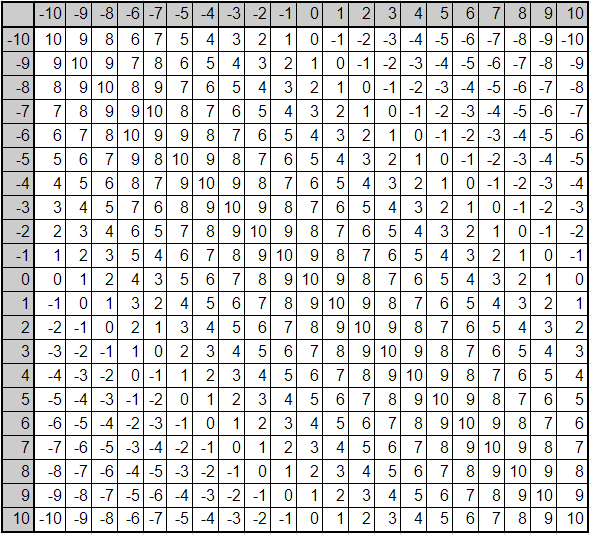
Part One presents a large coordinate grid on your physical sheet and two values on screen, and your task is to find the single number at their intersection.
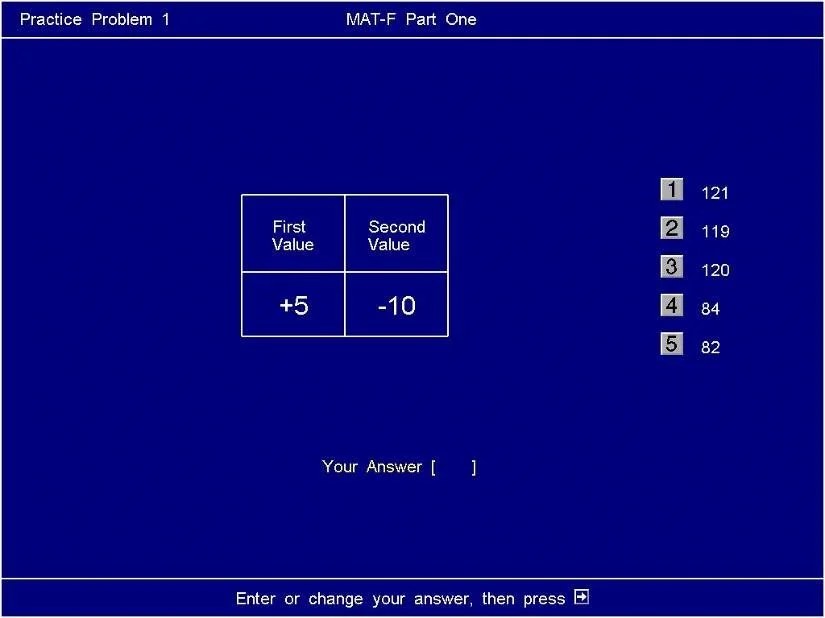
The interface has two components: the physical double-sided reference sheet, which contains the numerical grid, and the screen, which displays a labelled table with two fields, First Value and Second Value. The grid in the actual test runs from -17 to +17 on both axes. Every cell in the grid holds a fixed number that does not change during the test.
The grid behaves like a coordinate plane. Similar to reading a map grid reference, you bring one value across and one value down until they meet. The intersection holds the answer. Before you interact with it, the grid is entirely static; every value is pre-calculated and fixed.
Worked example: First Value is +5, Second Value is -10. You locate +5 on one axis and -10 on the other. The cell at their intersection is -5. The intersection value is identical regardless of axis assignment; +5 across and -10 down produces the same result as -10 across and +5 down. If you see two values displayed, you infer one lookup point, and the axis direction does not alter the output.
When the screen displays a First Value and a Second Value, you must locate the intersection of those two coordinates on the physical grid and identify the number held there. When you have identified that number, you match it to the correct option from the five multiple-choice answers displayed on the right side of the screen, numbered 1 through 5, and enter that digit on the keyboard. You then press the advance key to confirm and move to the next question.
Part Two
Part Two replaces the single coordinate grid with a set of multiple tables and requires you to cross-reference three screen-displayed values to extract one specific output.
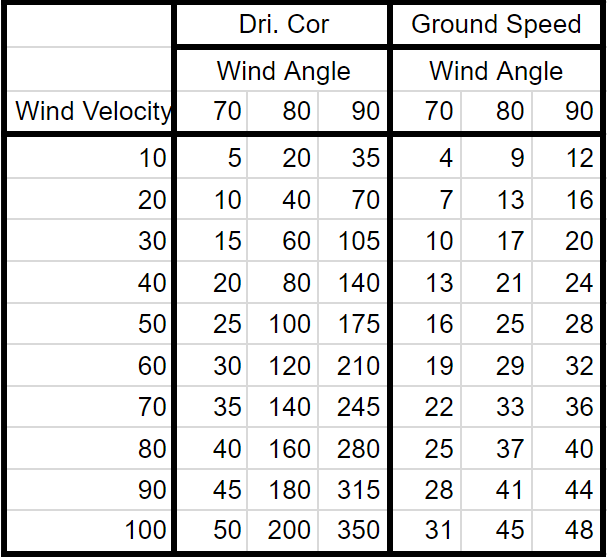
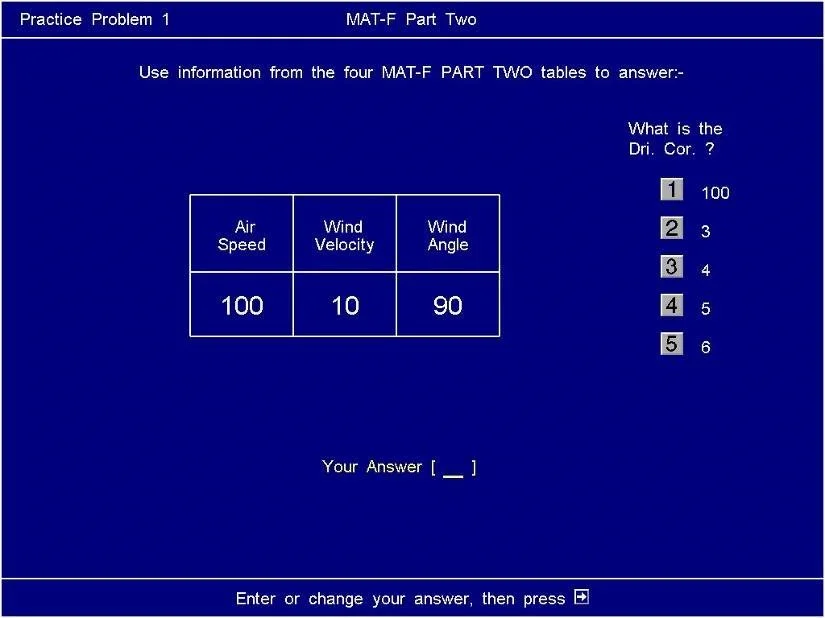
The screen presents three values: Air Speed, Wind Velocity, and Wind Angle. The physical sheet contains multiple tables, each corresponding to a different Air Speed. Within each table, Wind Velocity indexes the rows and Wind Angle indexes the columns. Each table provides two separate output categories, Drift Correction (Dri. Cor.) and Ground Speed, each with its own set of columns corresponding to Wind Angle.
The tables are static and laid out on your physical sheet before the test begins. The screen asks for one specific output per question, either Dri. Cor. or Ground Speed, stated clearly in the question field. The five multiple-choice options displayed on screen are the only valid answers; you do not calculate or derive values independently.
Worked example: The screen shows three values, one for Air Speed, one for Wind Velocity, and one for Wind Angle, and asks for the Dri. Cor. You first identify which table on your sheet corresponds to the given Air Speed. You then locate the row matching Wind Velocity. You then move across that row to the column matching Wind Angle under the Dri. Cor. section. The number at that cell is your answer. If you see Air Speed, Wind Velocity, and Wind Angle together on screen, you must infer the correct table first, then the correct row, then the correct column, in that sequence.
When the screen specifies all three values and names the output it requires, you must execute the three-step lookup: table, row, column. When you reach the correct cell, you match that number to the corresponding option (1 through 5) listed on screen, enter the digit, and advance.
Practice Available? Coming Soon
Reading the mechanics of a grid lookup is passive; executing rapid, accurate cross-references under a time limit while managing a physical sheet and a screen simultaneously is a different cognitive demand. The Air Defence Academy's CBAT/MACTs module will replicate that dual-input pressure, the physical sheet, the timed screen display, and the five-option response format, in a simulation environment that makes the multi-tasking load measurable before the actual test.
Start the simulator, or move to the next guide: Air Defence Academy CBAT/MACTs Course