
Situational Awareness Test (SAT)
Situational Awareness Test (SAT)
The Situational Awareness Test measures how much operational data you can hold and retrieve accurately from a grid-based display before it disappears and you are questioned on its contents.
The Grid and the Right-Hand Panel
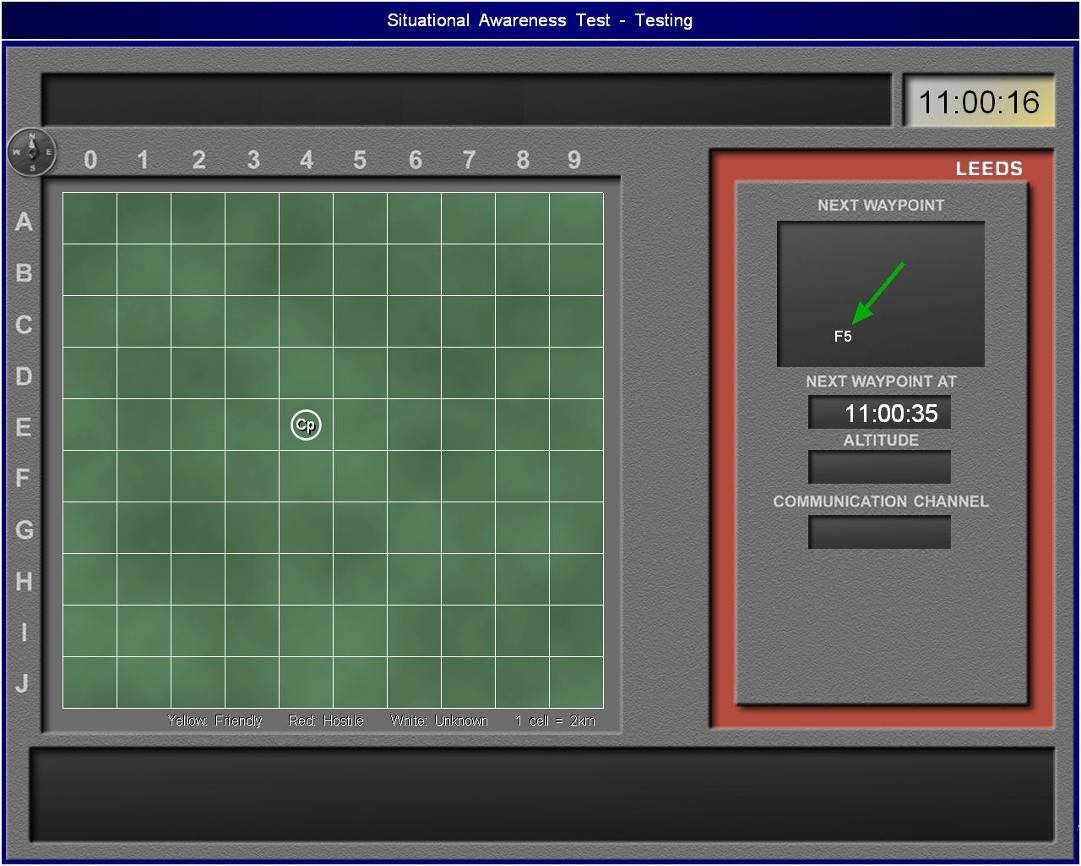
The screen presents a grid with columns labelled 0 through 9 along the horizontal axis and rows labelled A through J along the vertical axis, giving each cell a unique coordinate reference. The legend beneath the grid states that each cell represents 2 kilometres, and that unit colours carry a fixed meaning: Yellow identifies a Friendly unit, Red identifies a Hostile unit, and White identifies an Unknown unit. Units appear on the grid as labelled icons inside geometric markers. To the right of the grid, a separate panel displays flight data for a named controller aircraft. That panel contains four data fields: Next Waypoint, Next Waypoint At, Altitude, and Communication Channel. The panel header carries the aircraft's callsign. The Next Waypoint field displays both a green directional arrow and an alphanumeric grid reference. A clock in the top-right corner of the full interface shows the current test time.
How the Display Behaves Before You Are Questioned
Information arrives through three channels simultaneously: verbal audio, on-screen text, and visual imagery. These channels do not synchronise; a unit's grid position may appear visually before its callsign is read aloud, or the Altitude field in the panel may populate after the Next Waypoint reference is already shown. Not all four panel fields will be filled at the same moment. The grid and the panel remain visible during the information phase. When that phase ends, all unit positions, all labels, and all panel data are removed from the screen. You then answer multiple-choice questions about everything that was displayed.
Worked Example
The panel header reads LEEDS. The Next Waypoint display shows a green arrow pointing toward the lower-right and the grid reference F5. The Next Waypoint At field shows 11:00:35. The current clock reads 11:00:16, placing the waypoint event 19 seconds away. The Altitude and Communication Channel fields are blank.
If you see LEEDS as the callsign, F5 as the next waypoint, and 11:00:35 as the arrival time, you must hold all three as a single linked record. When Altitude and Communication Channel populate, you extend that same record. If a question asks for the Communication Channel of LEEDS and that field never populated, the correct answer will reflect that the data was not displayed rather than requiring a value you never received.
Simultaneously, a unit labelled Cp appears inside a circle at approximately column 3, row E on the grid. The circle is its icon type. You must hold its column number (3), its row letter (E), its label (Cp), and its colour classification. Similar to a chessboard read, the column comes first: 3-E, not E-3.
Conditions and Actions
When a unit appears on the grid, you must record its column number, its row letter, its label, its icon shape, and its colour classification as a single grouped entry. When the aircraft panel updates a previously blank field, you must append that value to the aircraft's existing record immediately. When the Altitude or Communication Channel fields remain blank at the point the information phase ends, you must proceed without those values; blank fields can generate questions where the correct answer is that the data was not shown. When all data is removed from the screen, you must respond to each multiple-choice question from memory alone. When the time limit approaches and questions remain unanswered, you must submit whatever answer is closest to your encoded record rather than leaving the question blank.
Reading the mechanics is passive; passing requires active cognitive endurance under live grid conditions with simultaneous audio input and a disappearing display. Access the precise training simulator in the Air Defence Academy's CBAT/MACTs module.
Start the Simulator, or move to the next guide. Spatial Integration Test (SIT)