Auditory Capacity Test (ACT)
Auditory Capacity Test (ACT)
The ACT tests your ability to keep a ball centred inside a moving tunnel while managing up to six simultaneous audio-driven tasks that stack across rounds without resetting.
The Tunnel and Joystick
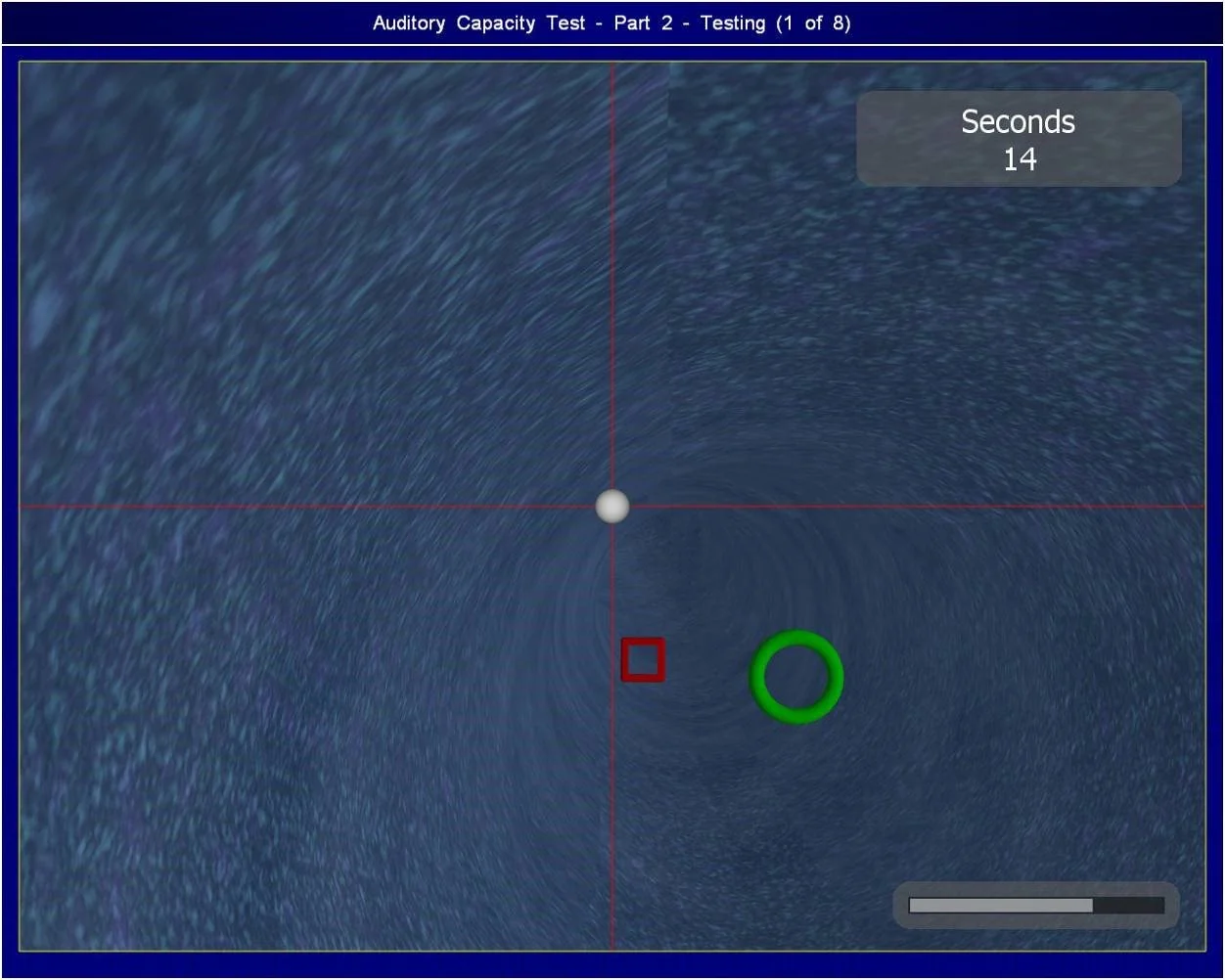
The screen shows a white ball inside a tunnel rendered in first-person perspective, and you steer it using a joystick. The tunnel curves, rises, and narrows continuously. The ball moves forward automatically; your only input is lateral and vertical position. A keyboard sits within reach of your non-dominant hand and is unused in round one.
The tunnel begins wide and curves gently, then tightens and accelerates as the round progresses. Wall contact deducts points incrementally, and contact time compounds the penalty; a two-second brush costs more than twice a one-second brush.
Worked example: the tunnel curves right, then immediately dips. You push the joystick right to track the curve, then add downward pressure before the dip completes, blending both corrections into one continuous input. If you overcorrect on the rightward curve and drift toward the left wall, you apply a short input back toward centre before the next curve begins. You never release and re-grip; all corrections happen through graduated pressure.
When the ball approaches a wall, you must apply a corrective joystick input toward the tunnel centre. The ball repositions and the penalty stops accumulating.
Coloured Shapes
Coloured shapes appear inside the tunnel and you must fly through them, or avoid a specific one when an audio rule applies. The shapes are circles, squares, and triangles in red, green, and yellow. In the first shape round, no rule applies; you fly through every shape. In later rounds, an audio instruction plays before the round and names one specific shape to avoid, for example: "Do not fly through the next green circle."
Worked example: you hear "Do not fly through the next green circle." A red square appears and you fly through it normally. A green circle appears next; you steer the ball around its outer edge. A yellow triangle follows; you fly through it. The avoidance rule is now spent until a new instruction replaces it.
When you hear a shape-avoidance instruction, you must hold it in working memory alongside active tunnel navigation and wait for that specific combination of colour and shape. When it appears, you steer around its edge rather than through its centre. When the avoided shape has passed, the default rule (fly through all shapes) resumes.
Top Tip: convert the instruction into a two-word tag the moment you hear it, for example "green circle off," and repeat it silently on each breath cycle until the shape appears or a new instruction replaces it.
Beep Response
A short beep plays at irregular intervals and you must press the joystick trigger as quickly as possible after each one. The response window is narrow; a late press and a missed press both register as errors. The beep layer continues across every subsequent round without pause.
Worked example: a beep sounds mid-correction while the ball drifts toward the left wall. You press the trigger with your thumb while maintaining the corrective right input with the rest of your grip. The correction continues uninterrupted; the press takes approximately one tenth of a second.
When a beep sounds, you must press the joystick trigger immediately without interrupting joystick movement. The two actions are simultaneous, not sequential.
Top Tip: rest the thumb lightly on the trigger at all times between beeps so the press is a contraction, not a reach.
Ball Number Update
A spoken instruction names a digit and tells you to change the ball number, and you must press the corresponding key on the keyboard while maintaining joystick control. The current ball number is displayed on screen and updates immediately on a correct key press.
Worked example: "Change ball number to seven" plays while the tunnel curves left. You maintain the left correction with the joystick in your dominant hand and press 7 with your non-dominant hand. The on-screen display updates to 7. Your non-dominant hand returns to neutral resting position.
When you hear a ball number instruction, you must press the named key without releasing or pausing joystick input. If the on-screen display does not update, the key did not register; press it again.
Digit Sequence Memory
A spoken sequence of four to six digits is read once and you must recall and enter it on keyboard when prompted at an unpredictable point later in the same round. The sequence plays once only. The recall prompt arrives during active tunnel navigation, not during a pause.
Worked example: you hear "Memorise this number: 3, 8, 1, 5." The round continues for approximately ninety seconds. You then hear "Enter the number now." You type 3, 8, 1, 5 on the keyboard while the joystick remains in your dominant hand, entering each digit without shifting gaze away from the tunnel for more than one keystroke at a time.
When the recall prompt occurs, you must type the sequence in order without pausing tunnel navigation. If one digit is lost, enter what you retain; a partial sequence scores better than no entry.
Top Tip: on hearing the sequence, immediately group the digits into pairs and rehearse the pairs rather than the individual digits, reducing four memory items to two.
Background Noise
Background noise is added as an acoustic layer over the audio instructions, reducing your ability to isolate spoken content. The noise carries no information; it is a masking signal. Instructions do not increase in volume or slow in pace to compensate.
When background noise partially obscures an instruction, you must act on what you heard with confidence rather than waiting for repetition, because instructions play once. If you caught the shape type but not the colour, apply the avoidance rule to every shape of that type for that instruction cycle until a new instruction replaces it.
Call Sign Filtering
Instructions are now prefaced with a call sign, and you must act only on instructions addressed to your assigned call sign or signs. At the start of the round, you receive one to three call signs drawn from the NATO phonetic alphabet, for example Alpha, Bravo, or Charlie. Every instruction then carries a spoken prefix before its content. Similar to a radio operator monitoring a shared frequency, you identify the call sign before processing the content of any message.
Worked example: your assigned call signs are Alpha and Charlie. You hear "Bravo, do not fly through the next red square." You take no action. You then hear "Alpha, change ball number to three." You press 3. You then hear "Delta, enter the number now." You take no action.
When an instruction plays, you must identify the call sign first. If it matches one of your assigned signs, you execute the action. If it does not match, you discard the content and return full attention to the tunnel.
When the time limit for any round approaches, you must continue all active tasks simultaneously rather than prioritising one. Suspending joystick input to complete a keyboard entry produces compounded penalties across both tasks.
Reading the mechanics is passive; passing requires active cognitive endurance. The ACT layers six concurrent demands onto a live joystick task, a pressure state no description replicates in real time. Access the more challenging ACT training simulator in the Air Defence Academy's CBAT/MACTs module.
Start the CBAT/MACTs module, or move to the next guide: Cognitive Updating Test (CUT).