Dynamic Projection Test (DPT)
Dynamic Projection Test (DPT)
The Dynamic Projection Test requires you to simultaneously navigate two aircraft through ordered gate sequences while a third intercepts a moving enemy, all within a shared airspace where altitude separation is enforced at all times.
The Interface
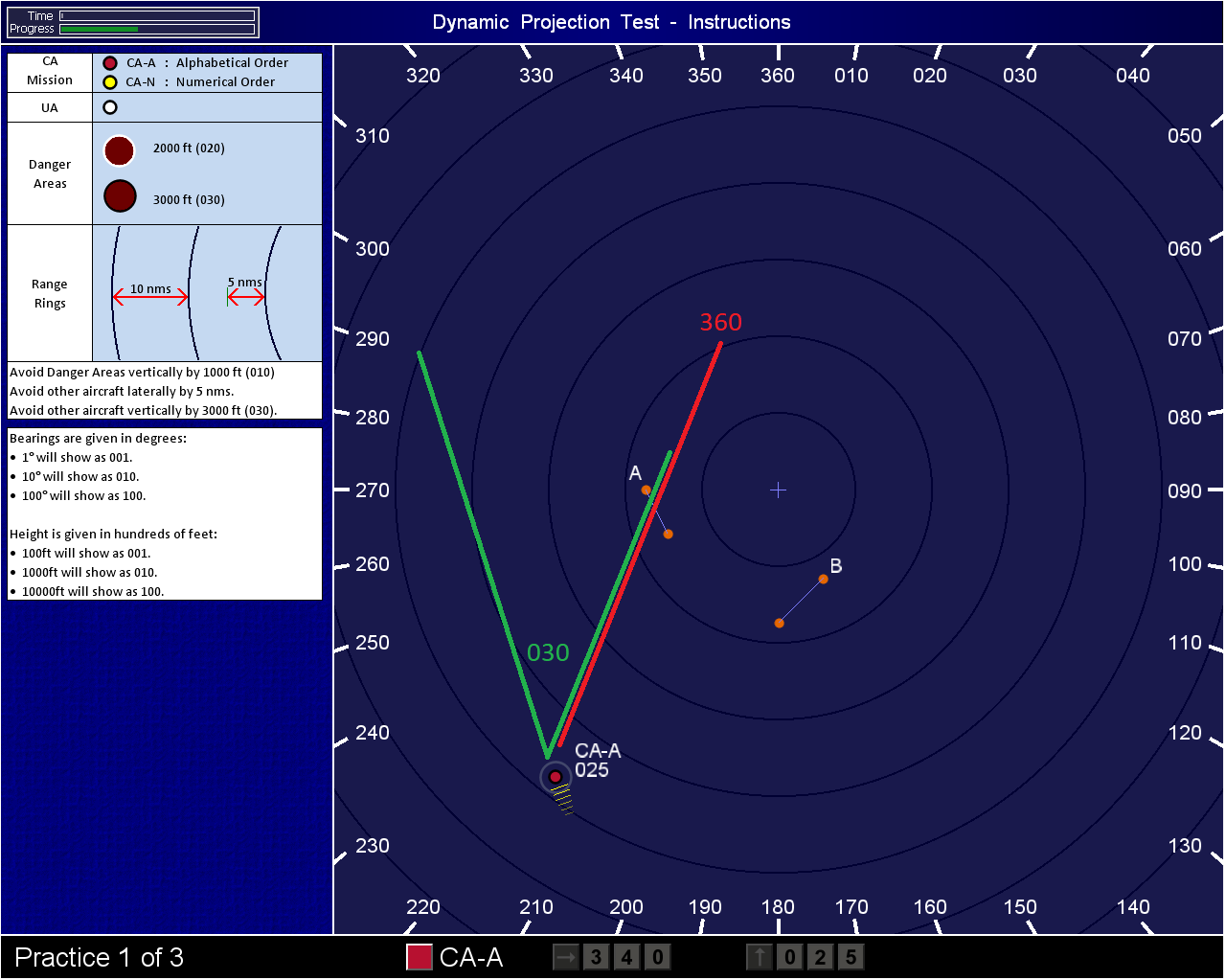
The display is a 2D overhead radar screen. Three aircraft are visible: CA-A (Red), CA-N (Yellow), and the Interceptor (Green). Gates appear as labelled waypoints, alphabetical for CA-A and numerical for CA-N. Danger areas are large red circles printed directly onto the display. Each aircraft carries a white altitude readout positioned adjacent to it (e.g., 025 = 2,500 ft). Bearing values are printed in white around the outer edge of the screen. White enemy aircraft enter the display during the intercept phase.
Aircraft Behaviour Before Input
All three aircraft travel continuously on whatever heading you last assigned. They do not orbit or hold position. Enemy aircraft enter the screen on fixed headings and altitudes, then may alter their flight path in the latter stage of the test. Danger areas are static. Transiting aircraft may cross the screen at any altitude without warning.
Bearings: Worked Example
The most common failure in the DPT is applying map-north bearings to an aircraft that uses its own relative north, and the bearing guides printed on the screen are referenced to map-north only.
When CA-A is tracking south-east at approximately 135 degrees on the screen and Gate Alpha lies due north of its current position, the correct input is not 360. Because the aircraft's own nose points south-east, map-north is behind and to its left. The required input is approximately 225 degrees relative to the aircraft's heading, not the map. The rule is: scan the aircraft's current track, estimate the angle to the gate measured from that track, then input that offset. The display bearings confirm orientation only; they do not substitute for relative calculation.
Altitude Rules
Two separation thresholds govern every second of the test. Aircraft must maintain at least 3,000 ft of vertical separation from one another and from any transiting aircraft on screen. Aircraft must remain at least 1,000 ft clear of danger area altitudes. White-outlined danger areas sit at 2,000 ft; black-outlined danger areas sit at 3,000 ft.
When a transiting aircraft closes within 3,000 ft of CA-A or CA-N vertically, you must climb or descend the affected aircraft until the buffer is restored. When CA-A or CA-N enters the radius of a danger area, check its altitude readout against the danger area's band and adjust if the gap is below 1,000 ft.
Top Tip: Assign CA-A to 10,000 ft and CA-N to 7,000 ft at test start. This creates automatic 3,000 ft separation between them from the outset, removing that variable from your working memory. Both altitudes also sit well clear of danger area bands, meaning you monitor only for transiting aircraft rather than managing three simultaneous conflicts.
The Intercept
The Green aircraft must close within 1,000 ft of the enemy's altitude and physically converge with the enemy's track. Similar to a billiards shot, you aim at the projected crossing point, not at the enemy's current position; tracking directly toward the enemy produces a tail-chase and a missed intercept.
When the enemy enters the screen, project its track forward as an imaginary line. Project a second line from Green toward a point on that track where the two paths cross geometrically. Set Green onto that heading. When the enemy descends or climbs in the latter stage, you must update Green's altitude to remain within 1,000 ft of the revised reading while continuing to manage CA-A and CA-N gate sequences.
When a clean crossing geometry is not immediately obvious, set Green's altitude first, then resolve the heading. Altitude inputs take longer to take effect under split attention; clearing that variable early removes one active failure condition.
Top Tip: Assign Green's altitude to within 1,000 ft of the enemy on first contact, before the intercept geometry is resolved. The altitude window is the harder condition to recover if missed late; the heading can be corrected faster.
Reading the mechanics is passive; passing requires active cognitive endurance.
DPT Module is under development for now, stay tuned for updates and move to the next guide: