Spatial Integration Test (SIT)
Spatial Integration Test (SIT)
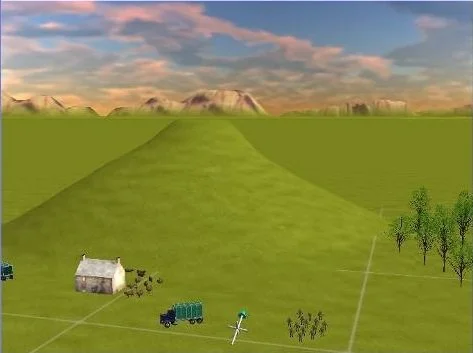
The SIT requires you to encode up to nine sequential information tabs into a single mental model, then answer multiple true-or-false questions about a 3D rendered landscape that plays immediately after the tabs close.
The Interface and Components
Each round presents between eight and nine tabs, each displaying one isolated layer of information. Tab one shows the farm position only. Tab two shows the truck position only. Tab three shows the troops only. Tab four shows the trees only. Tab five shows the red and yellow aircraft flight path on the 2D grid. Tab six shows the red and yellow aircraft speed and altitude chart. Tab seven shows the helicopter flight path. Tab eight shows the helicopter speed and altitude chart. All tabs are visible for one minute in total, after which the 3D scene video plays and multiple true-or-false questions are asked.
Behaviour of the Tabs
Each tab isolates a single object or data layer; no tab shows the full picture at once. You must construct the complete spatial model yourself by accumulating each tab's information across the sequence. Because the entire tab sequence runs for one minute, the time available per tab is not equal across all eight or nine; you cannot afford to linger.
Worked Example
Tab one appears: the farm sits two grid squares left of centre. Tab two: the truck sits three squares left and one below centre. You infer: these two objects occupy distinct grid zones and do not overlap. By tab four you have logged trees to the right mid-section and troops at bottom-centre. Tabs five and six then show the red and yellow aircraft entering from the lower-left, accelerating as its flight path dots tighten near the mountain grid position, then slowing on exit, confirmed by the altitude chart's rising-then-spreading dot pattern. Tabs seven and eight repeat this reading for the helicopter. The 3D scene then plays. The question reads: "Is the truck accurate?" You check only the truck's type and grid position against what tab two showed. The answer is independent of whether the aircraft or helicopter paths render correctly.
Flight Path Tabs: Condition and Action
When tab five appears, the red and yellow aircraft's route is drawn as a dot sequence on the circular grid. When dots cluster tightly, the aircraft moves fast at that segment; when dots spread, it moves slowly. When tab six appears, the altitude chart confirms whether the aircraft climbs or descends across those speed changes. Overlay these two tabs against the object tabs: if the aircraft path crosses the grid zone where tab four placed the trees, the 3D scene should show the aircraft passing over that terrain feature at that position. When tab seven appears, apply the same reading to the helicopter's path. When tab eight appears, pair it with tab seven to complete the helicopter's speed-altitude profile.
The Accuracy Condition
When a true-or-false question names a specific object, evaluate only that object's type and position against its corresponding tab. If the named object is present in the correct quantity and at the correct grid location in the 3D scene, the answer is true, even when other objects in the same scene are incorrectly placed or missing. Hills are always rendered correctly in the 3D scene and function as fixed reference anchors from the first tab onward.
Top Tip: Assign a fixed mental quadrant to each tab as it appears, upper-left, upper-right, lower-left, lower-right, relative to the hill anchor. This gives you a consistent spatial filing system across all eight or nine tabs rather than rebuilding orientation on each new tab.
Practice Available? - YES
Reading the mechanics is passive; passing requires active cognitive endurance under tab-switching, single-play video, and a 50-second answer window with no replay. Access the precise training simulator in the Air Defence Academy's CBAT/MACTs module. Start the Simulator, or move to the next guide:
Start the Simulator, or move to the next guide: System Logic Test (SLT)